01
A set that is already built
Every clip opens on the same plain orange wall, with one microphone hanging between you and a steady camera. You write no prompt and tune no settings, so your two photos are the entire input.
Saw the orange booth clip and want to be in it? Add one photo of each person, choose a shape and length, and the hotel lobby AI video comes back with the beat already in it.
1Add two photos
2Quality & length768p · 15s · 9:1660 credits
No subscription · Ready in about 3 minutes · Not charged if it fails
THE TREND
It is a short clip of two people in a plain orange booth, leaning toward a single microphone that hangs from the ceiling and trading verses. The look comes from a 2022 COLORS performance of "Hotel Lobby (Unc & Phew)" by Quavo and Takeoff of Migos. People now drop themselves, their friends or their pets into that booth and post the result, which is why you also see it called the Migos AI trend or the hotel lobby trend. We are not affiliated with the artists, Migos or COLORS. A hotel lobby AI video is not a face swap pasted on the original footage. The whole clip is generated fresh from your two photos, so no editing skills are needed.
Start My Hotel Lobby AI VideoHOW TO MAKE IT
Three steps, shown with the exact two photos we uploaded and the hotel lobby AI videos that came back, untouched. Neither photo is a studio shot: one is a close-up selfie, the other a dim mirror selfie with a phone in hand.
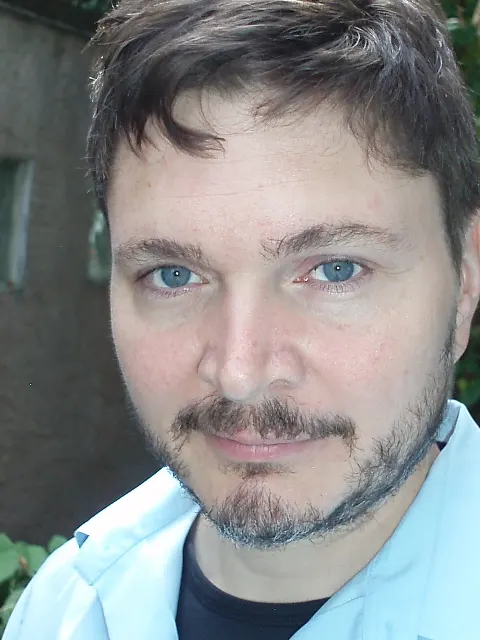
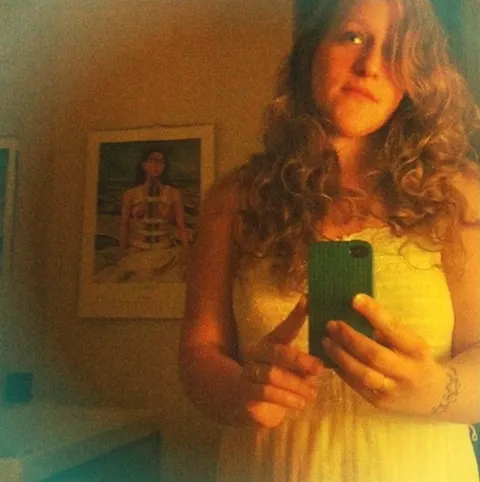
9:16 or 16:9, 768p, 5 to 15 seconds. Press generate and keep the page open for 2 to 3 minutes.
Every render is a little different. If the first one looks off, run it again before you change photos.
Pair 01
Put yourself on the left and your closest friend on the right. A hotel lobby AI video of two friends works because both faces stay recognizable, so it feels like the pair of you rather than strangers. Post it and tag your friend; the tagging is where most of the replies come from.
Pair 02
Couples use the clip as an anniversary post or a running joke. Any two people can do it, whatever their gender, since the tool only cares which photo goes on which side. Choose photos where you both wear what you want to see on screen, because the outfit you upload is the outfit you get.
Pair 03
Dad and his adult son, two sisters, a mother with her grown daughter: family versions travel well beyond TikTok and land in group chats. The booth never changes, so only the people do, and a surprising pairing tends to get the loudest reaction in the thread.
Pair 04
Some people cast a dog, a cat or a cartoon character instead. It can work, though the results are less steady than with human faces. A sharp, front-facing photo with the whole head in frame gives the best odds. If the first try looks odd, try another picture before you give up.
BEFORE YOU UPLOAD
WHAT YOU GET
01
Every clip opens on the same plain orange wall, with one microphone hanging between you and a steady camera. You write no prompt and tune no settings, so your two photos are the entire input.
02
Your left photo becomes the person on the left, and your right photo becomes the person on the right. They lean in one after the other, with confident hand gestures, and the two faces never blend.
03
Choose portrait 9:16 for TikTok and Reels, landscape 16:9 like the original, or a square. The hotel lobby AI video runs 5, 10 or 15 seconds at 768p, and the button shows the credit price before you commit. Five seconds costs 20 credits.
04
The clip arrives with a beat and both voices, timed to the movement. Save it and post it. There is nothing to add in another app.
Add one solo photo for the left person and one for the right, choose a shape and length, then press generate and sign in. Your clip appears under the button in two to three minutes. There is no prompt to write and nothing to install, and the finished clip comes with audio already inside.
Each clip is charged in credits: 20 for 5 seconds, 40 for 10 and 60 for 15, all at 768p. The button shows the exact price before you start. Plans start at $7.99 a month for 200 credits, which covers ten 5-second clips. Fifteen-second clips are only open to subscribers.
No. This page runs in your phone browser. Pick photos from your camera roll, generate the clip and save it back to your phone. TikTok and CapCut have no tap-to-apply filter for this trend, so what people call the filter is simply a clip made with a tool like this one.
Yes. The hotel lobby trend, the Migos AI trend and the COLORS AI trend all describe one video: two people in an orange booth sharing a hanging mic, inspired by the Quavo and Takeoff performance. A hotel lobby AI video from this page uses your own two photos and a beat made by the AI, not a copy of the song.
Two, with one person in each. A plain selfie is enough, as the example above shows. Bright light and a face turned toward the camera help most. If you only have group pictures, crop one person out first, because two faces in a single box confuse the result.
The clip keeps the clothes shown in your photos. To dress differently, upload a photo of that person in the outfit you want. A close crop that hides the clothes is allowed, but then the AI chooses an outfit for you, so a wider shot gives more control.
Your clip downloads to your phone with sound included. Choose portrait 9:16 and it fills the screen on TikTok, Reels and Shorts. Looking for a different trend after this one? Our home page has the AI zombie trend generator, which runs on the same credits and the same plans.
KEEP EXPLORING
One orange wall, one mic and the two of you trading verses, with the beat included.
Make My VideoFROM 20 CREDITS · WITH SOUND · RUNS IN YOUR BROWSER
Get Behind the Mic
Start My Hotel Lobby AI Video